
Garmin technology on the bike
Garmin has its own Store, its app shop. I can say "i live there" because I am creating and updating apps the whole day. Yes, I have built a few, and when I say apps I mean apps or data fields for Garmin, which are not the same thing but for practical purposes here they act the same. If you carry a Garmin Edge on the bike (I do), you already have half the job done to install things on it. What many cyclists do not know is that the Connect IQ Store has apps that show you all sorts. For example I built two data fields. One shows, in real time, the wind hitting you as you ride. The other tells you when to eat and when to drink. Both right there on the head unit screen, without pulling out your phone, without opening another app.
Free to install. Takes two minutes. Works on 33 Garmin devices.
Get MoguWind for Garmin →This guide on the MoguWind blog covers everything you need to know about apps in general and wind apps for Garmin. I will talk about mine too, they are free, this blog is not going to try to sell you anything. What a data field is, how you install one, what useful information you can keep on screen as you ride, which devices are compatible and why the MoguWind App is free and always will be.
Garmin for cyclists
Below you have the most recent guides on the blog about Garmin, aimed mostly at cycling, and at the end the most read articles. All of it is for the cyclist who already has a Garmin or is thinking of buying one. If you do not have one, no problem, you can still learn, but this guide will be less useful to you. You do not need to be technical to follow any of it, whatever gets taken for granted is explained first.
What a data field is and why it matters
A data field is a piece of software that fills a slot on your Garmin data screens during an activity. It is what shows your speed, your heart rate, your cadence, your power. All of that comes preinstalled from the factory.
The interesting part comes when you find out that the Connect IQ Store lets you download third party data fields that extend what your Garmin can show. MoguWind, my wind app, draws an arrow with the wind direction. Bidón, the other one I built, counts down to your next gel and your next sip. That is where apps for wind, nutrition, estimated power, ambient conditions and any variable the maker did not include as standard come in.
A data field takes a small slot and shows real time information, refreshed several times a second. It is the natural way to put wind on screen, because wind is a figure you want to read at a glance while you push. It can also take the whole screen, some fields use that layout to show more, and many data fields have a big version and a small version.
Free to install. Takes two minutes. Works on 33 Garmin devices.
Get MoguWind for Garmin →What a good wind data field like MoguWind shows
A decent wind data field has to give three things at minimum, without forcing you to interpret.
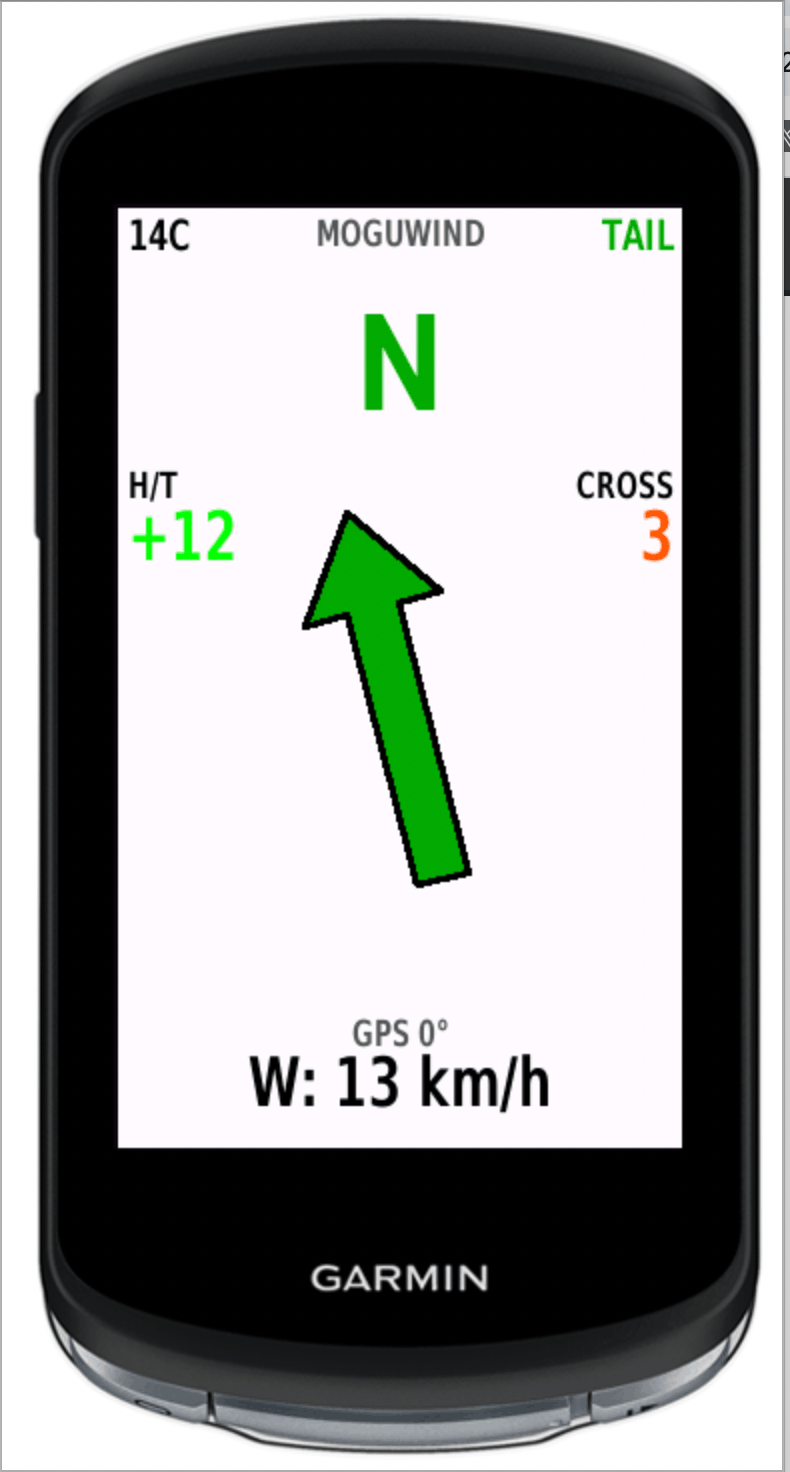
An arrow pointing where the wind is going, relative to your direction of travel. Not magnetic north, the compass already does that. If the arrow points at you, the wind is in your face. If it points ahead, it is pushing you along. So at a glance you know whether you have a headwind, a tailwind or a crosswind, with no mental translation.
The numeric components split out. Head and tail (H/T) on one side, cross (CROSS) on the other. Both in km/h. Without this you only have the feel, not the number.
The speed. Because a 45 km/h gust at ninety degrees to your travel is a stability matter, not an effort one. The wind affects you a lot, and that is why a data field earns its slot.
And as an extra, the absolute cardinal direction to orient yourself against the landscape, and the temperature to know if you are dressed right.
The MoguWind App shows exactly this data, with two configurable slots to choose what you see first at any moment. It comes in handy for explaining what a data field is. As of today it is the only wind app on Connect IQ that also saves every second of data to the FIT file, so after the ride, in Garmin Connect, you see charts and summary metrics of the real wind you had.
Free to install. Takes two minutes. Works on 33 Garmin devices.
Get MoguWind for Garmin →What a nutrition data field like Bidón shows
Wind is one use for a data field. Fuelling is another, and it works on a completely different principle, which makes it a useful second example.
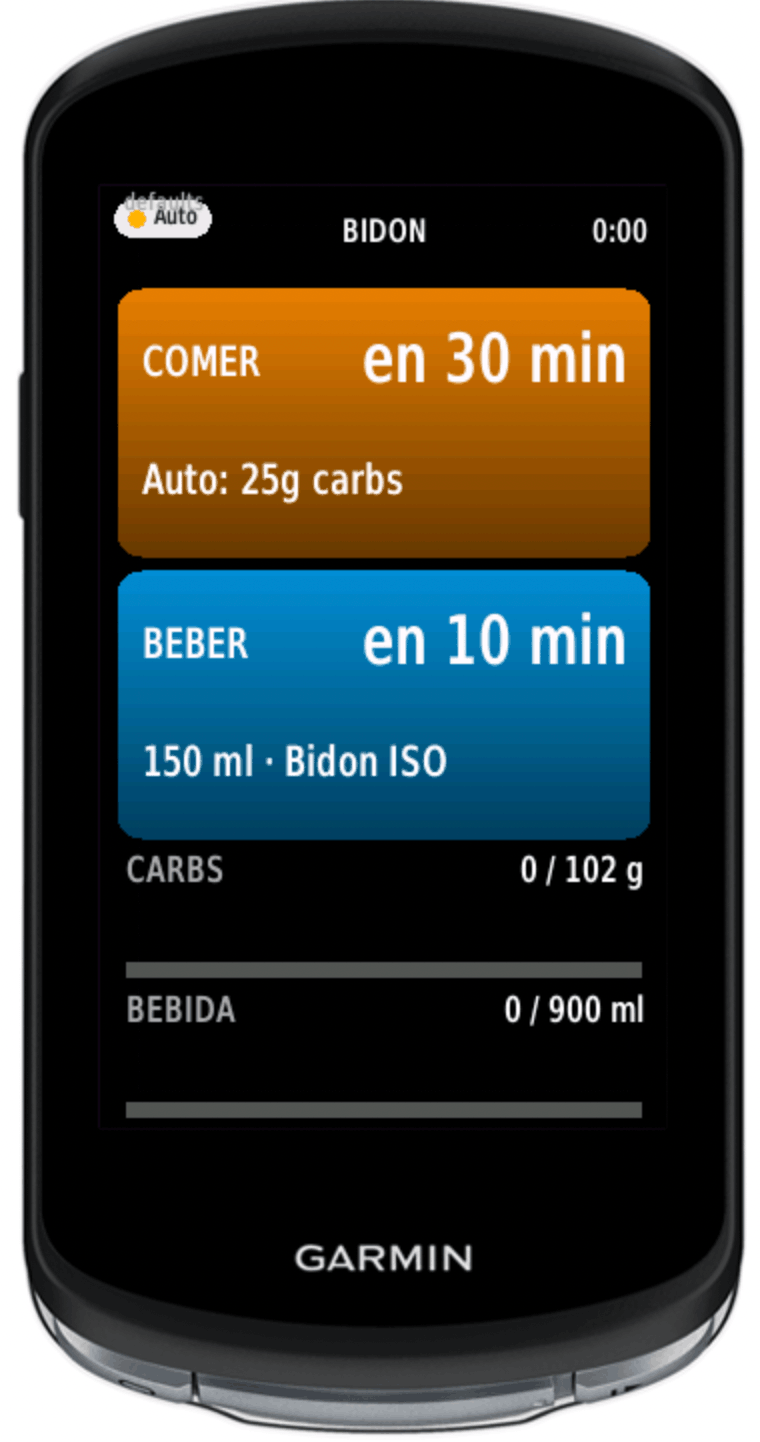
Bidón puts two boxes on the screen, EAT and DRINK, each with a countdown. When the moment arrives a full screen alert fires with a different beep for each one, low for food and high for drink, so you know which is which without looking down.
Where it gets its numbers from is worth being precise about. It does not know your route. No GPX, no elevation profile, no wind forecast. It works from how long you have been riding, how hard you are going, the temperature and the bottles you told it you carry. The figures follow published sports nutrition research, Jeukendrup for carbohydrate at roughly 30 to 90 g per hour, ACSM and Sawka for fluid and sodium, Maughan for the heat adjustment.
Three ways to run it. Auto works it out as you ride with no setup at all. Manual lets you fix your own grams and millilitres per hour from the Edge settings. And Plan follows a schedule you built at plan.moguwind.com with your own food, sent to the head unit once with a pairing code.
Like MoguWind it writes to the FIT file, so the carbohydrate and fluid show up in Garmin Connect afterwards. One caveat worth spelling out, Bidón has no way of knowing whether you actually ate, so what gets logged is what it told you to take.
Bidón. Eat and drink alerts on your Edge, free.
Install Bidón →How to install a data field on Garmin IQ step by step
No mystery to it. You need the Connect IQ Store installed on your phone (it comes with Garmin Connect) and your Garmin Edge paired. Keep it powered on next to you. Sometimes it does not catch first time, patience.
First, open the Connect IQ Store on the phone and search the app by name. In our case, MoguWind.
Second, tap install. The app downloads to your phone and syncs to your Garmin the next time the head unit connects over Bluetooth. Since you left it on next to you, that part is automatic.
Third, and this is the important one, on the Garmin Edge go to Settings, Activity Profiles, pick the profile you use (Cycling, Road, Gravel), Data Screens, choose the screen where you want the data field and add MoguWind in the slot you prefer, or add a new screen.
Fourth, start an activity. For the first few seconds the data field shows a dash while it acquires GPS and downloads the first wind reading. As soon as it has a fix, it starts showing the data.
This process is identical for any Connect IQ data field. Once you have done it once, you have it down. The whole thing is tested on 33 models, so your Garmin most likely fits already.
Which Garmin devices are compatible with MoguWind
The MoguWind App runs on 33 Garmin devices, covering the Edge, fēnix and Forerunner ranges of recent generations. The full list is in Garmin's own Connect IQ Store and on the product page at app.moguwind.com. If you have a high end device from 2019 onwards, it is very likely compatible.
The Edge range covered includes the 520 Plus, 530, 540, 550, 820, 830, 840, 850, 1030, 1030 Plus, 1040 and 1050, plus the Explore and Explore 2 series. On fēnix, the 6 Pro, 7, 7 Pro and 8 series in all sizes. On Forerunner, the 255, 955, 965 and 970. And on Epix, the Gen 2 and the Pro Gen 2 in the three sizes.
We publish detailed compatibility by model on the blog when a new one is added. If your device is not on the current list, it does not work. We would rather say so plainly than promise and disappoint.
Why it is free and always will be
MoguWind, both the App and the rest of the suite, is free by choice, not as a customer acquisition tactic. The infrastructure cost to serve these apps is close to zero (Cloudflare Workers, Open-Meteo, Connect IQ Store, all on free tier). There are no expensive servers to pay off.
We made the apps because we needed them and we wanted them free for the cycling community. There is no hidden Premium, no mandatory email, no invasive analytics. When someone asks how we plan to monetise, the straight answer is that we have not decided. Maybe one day there will be a sponsor or an optional extended version, but the data field you already use will stay free.
After the ride, the data left in Garmin Connect
Many wind apps show something pretty on screen and that is where the story ends. The MoguWind App records every second of data and saves it to the activity FIT file. When you upload it to Garmin Connect, five new charts appear (wind speed, head/tail component, cross component, direction and relative air speed) and eight summary metrics that include the average wind, the maximum headwind, the maximum tailwind, the percentage of time with each kind of component and the Wind Balance, an index from -100 to +100 that sums up whether the ride had more wind against or in favour.
This is what lets you truly understand why a ride went the way it did. When you see your average came out lower than expected but the Wind Balance was -60, you know it was not bad form, it was a bad wind day.
Free to install. Takes two minutes. Works on 33 Garmin devices.
Get MoguWind for Garmin →