
Garmin Connect IQ won't pair with my Edge, here's how I fixed it
One day my Edge 1030 Plus stopped pairing with Connect IQ. I share the problem, what Garmin support said and the two fixes that actually worked for me.
Connect IQ does not pair with my Garmin Edge
GARMIN UPDATE SEPT 2026
This is what GARMIN has said on the official forum:
To fix this you are going to need GARMIN EXPRESS (Another Garmin App, yeah) and a lot of patience, ok? Well, I develop Garmin APPS and Data Fields, so the connection between my EDGE and Garmin IQ is KEY for me, well, one day in September 2026 I picked up my phone to open Connect IQ and noticed my Edge 1030 Plus would not connect to the Store (Connect IQ I mean). At first I thought it was temporary, one of those glitches that fix themselves. Days went by and nothing changed, I discovered Garmin forums at that point, and many people with the same problem. Connect IQ still would not pair with the Edge. I started reading deeply those Garmin forums and saw it was not just me. It happens to a lot of people, and there is very little clear information about how to get out of it. So once I finally sorted it, I decided to write it down. If the same thing is happening to you, keep reading. I will tell you the problem as it was, what Garmin told me when I opened a ticket, and the two fixes that actually worked for me.
What Garmin Connect IQ is and why it matters
Connect IQ is Garmin's official store. It is where the apps, data fields, watch faces and widgets for your device come from. It is how you install new things and how the ones you already have get updated.
If Connect IQ stops working, you cannot install anything new and you cannot update what you already run. For example, you cannot download an app like MoguWind, which shows real-time wind while you ride, or move to a newer version of one you have. Whatever is already installed keeps showing on the head unit and keeps working, but you are frozen on that version. No patches, no improvements, no new features. It is like an app store with the shutter down. The device runs, but it stops growing.
For many people this goes unnoticed for a while, because the apps you use every day are still there. You feel it the day you want to install something, or when an app asks to update and there is no way.
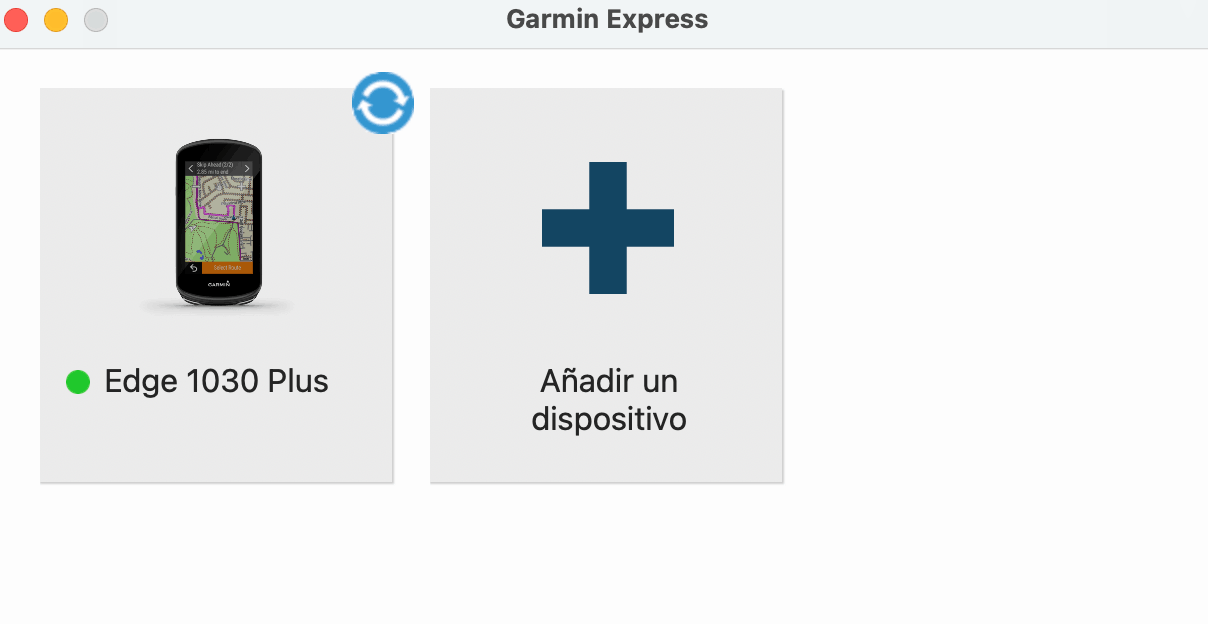
What Garmin Express is and why it is key
Garmin Express is Garmin's desktop app, for Windows and Mac. Most people never use it, and that is fair, because Garmin Connect on the phone handles almost everything day to day. It syncs activities, manages the device, and not much else is needed.
But for serious problems like this one, Garmin Express is the tool that opens doors the phone cannot. You download it for free from garmin.com/software/express/. You connect the device by USB to the computer and from there you reach the firmware, the advanced settings, and manual management of your Connect IQ apps. It is the service door you need when the front one is jammed.
How the problem showed up in my case
My Edge 1030 Plus was paired with Garmin Connect on the phone with no trouble at all. It recorded rides, it synced, all normal. What failed was Connect IQ. When I tried to download or update an app, it got stuck in queue, with that "in queue" message that never moves. I left it an hour, two hours, a whole day. Still in queue.
MoguWind, which is my own app, would not update. Other apps I already had installed kept working on screen, but there was no way to bring anything new to the device. The store was dead for that Edge.
Check this message from ROBERT in the Garmin Forums:
I tried the obvious things, the ones anyone would try. Restart the Edge. Restart the phone. Unpair the device and pair it again. Uninstall Connect IQ from the phone and reinstall it. Force close the app and reopen it. Nothing worked. And so it went for days, with the frustration climbing, because I did not understand what was going on or how to grab it.
What Garmin support told me
In the end I opened a support ticket. The first reply, in my own words, came to say that my device was outside Connect IQ support. That the apps I already had installed would keep working, but that I would not be able to install any new ones. No further context, no real explanation.
I replied politely that this did not add up. The Edge 1030 Plus is not an old box. It is a fairly recent head unit with plenty of hardware. Being dropped from the app store just like that made little sense to me.
The second reply was clearer and harder. They confirmed that Garmin had deliberately taken my device out of Connect IQ support. That it was a settled decision, that it would not be reversed, and that it was probably down to hardware limits for the latest versions. That on their side there was no fix.
It is hard to accept. The 1030 Plus is a high-end computer that still sells for more than 300 euros today. Being told it loses the app store for good does not sit well.
Why the support answer did not add up
This is where I have an odd advantage, which is that I build apps on Connect IQ. My app, MoguWind, runs today on 33 Garmin devices, and the Edge 1030 Plus is one of them. I know first hand how apps are compiled, for which firmware versions and which hardware, and the 1030 Plus has plenty of room for the apps that exist today in the ecosystem.
So I was left with a nagging feeling. My guess was that the problem was not the hardware, but something in the firmware or a device setting that had gone corrupt along the way. And that is exactly what it turned out to be.
The fix that actually worked
There are two routes. The aggressive one and the soft one. I will start with the one that worked completely for me, the aggressive one.
Route A. Fix CIQ from Garmin Express, the aggressive one
You connect the Edge by USB to the computer with Garmin Express open. In your device panel inside Express there is an option called Fix CIQ. CIQ is Connect IQ, in case it does not ring a bell.
You press the button and Garmin Express restores an earlier firmware version, one that repairs the Connect IQ connection. Important warning, and do not skip this. It wipes your custom setup. Activity profiles, data screens, sensor settings. All of that has to be rebuilt from scratch.
In my case, after doing this, the Edge connected to Connect IQ with no trouble and has not failed again in weeks. The store came back to life and I could update everything that was stuck.
Route B. Update apps one by one from Garmin Express, the soft one
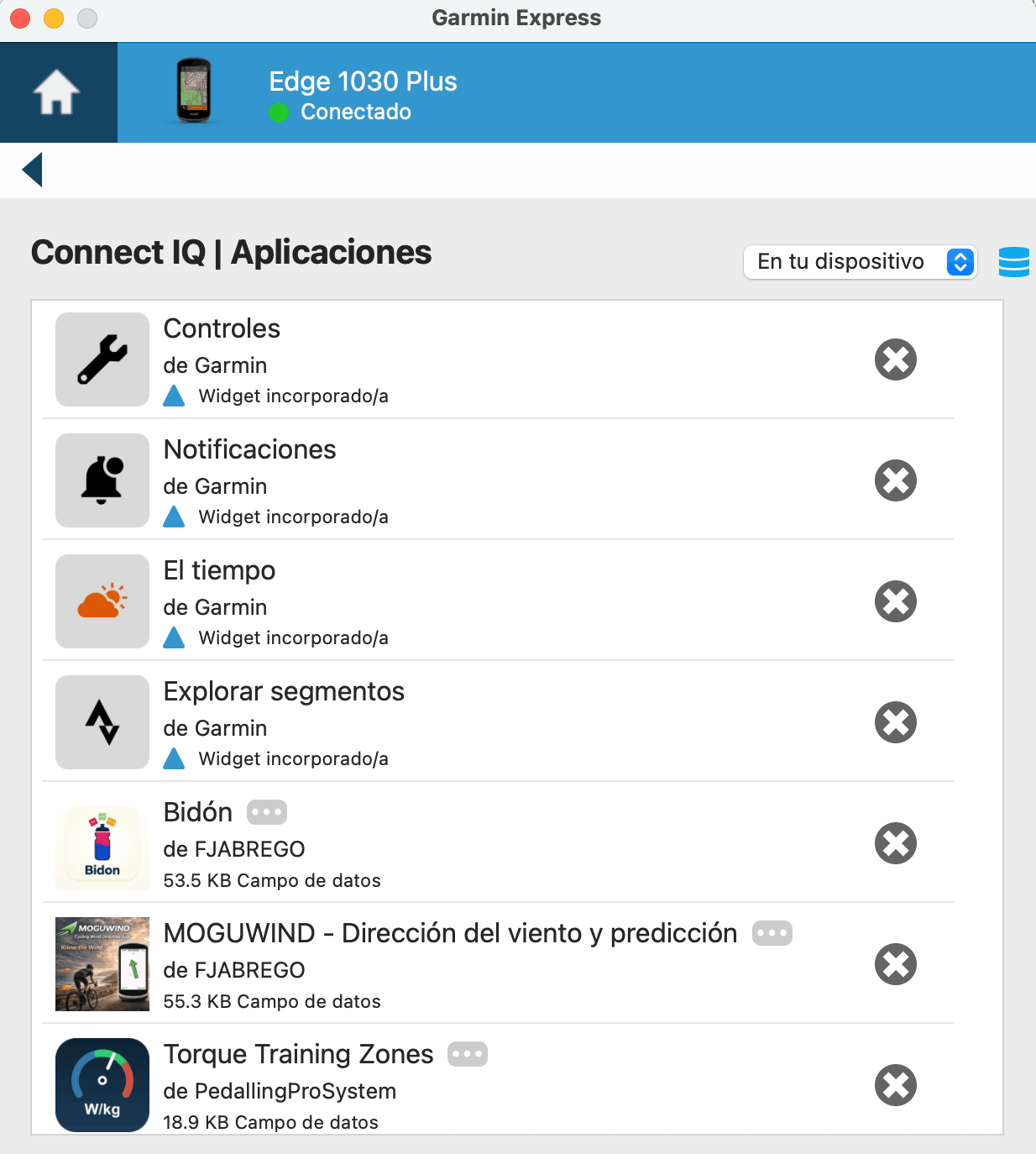
If you do not want to lose your setup, Garmin Express also has a section where you can manage Connect IQ apps one by one from the computer. It is not the friendliest interface, you have to dig around the device menu inside Express, but it is there.
From there you can update MoguWind and the rest of your apps without going through Connect IQ on the phone. This route does not fix the connection at the root, it only lets you keep the apps current while you wait for Garmin to solve it on their side. Spoiler warning, they are not going to solve it on their side.
My recommendation
If you have a moment to reconfigure the device, Route A is the definitive one. It leaves the Edge like new as far as Connect IQ goes. If you need to keep using the Garmin today without touching anything, Route B gets you out of the jam. I went with A. Rebuilding the data screens took me about 20 minutes and that was that.
My angle as a developer
As I said, I build MoguWind, an app for Garmin Edge that shows real-time wind while you ride, head, tail or crosswind. Living through this problem made me understand it from the other side of the counter.
Now, when someone writes to me saying MoguWind will not update on their Garmin, the first question I ask is always the same. Try connecting the Garmin to Garmin Express and running Fix CIQ. Nine times out of ten it sorts itself right there. If it helps, here is the step-by-step guide to installing MoguWind on your Garmin.
It is a problem that hits a lot of people and that Garmin does not document well. In this official Garmin forum thread you can read more context and stories similar to mine.
To wrap up
If you made it this far it is because you have the problem or someone close to you does. The good news is that the fix exists and it costs nothing. You just need to know where to pull, and now you do.
And since you are going to have the Garmin connected to Garmin Express anyway, take the chance to install MoguWind. You will see real-time wind while you ride, head, tail and crosswind, with an arrow and colours. It works on 33 devices and it is always free.
Free to install. Takes two minutes. Works on 33 Garmin devices.
Get MoguWind for Garmin →Install it free on your Garmin from the Connect IQ Store, it takes two minutes.
Get MoguWind for Garmin →Keep reading about the wind app for Garmin.