
Wind Direction in Cycling, Made Simple
A user asked for it and he was right. Now you choose if the compass letter shows where the wind comes from or where it's going. The arrow stays as always.
Since I launched MoguWind, one question comes up more than any other. "The arrow in cycling, does it show where the wind comes from or where it's going?" It makes sense that it happens. That is the exact spot where people get tangled up. In v2.6.2 I added a small option that sorts it out. I built it because a user asked for it. Here is how it works, and while we are at it, how to read the wind on the screen.
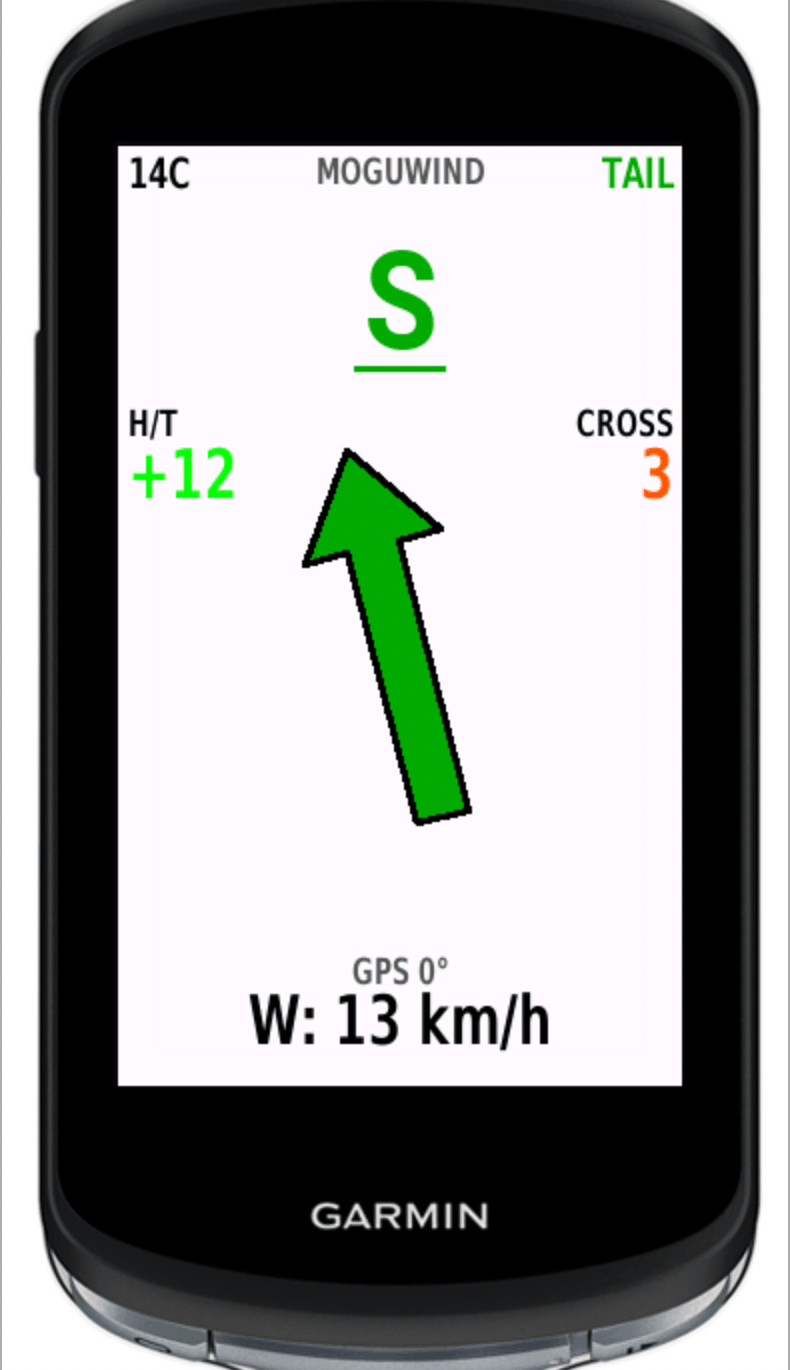
The arrow doesn't change, it always points where the wind is going
Let me start with the part that matters, so there is no confusion. The big arrow on the screen does not change. It never has. It always points where the wind is going. If it points straight up, that is a tailwind pushing you along in your direction. That stays the same. v2.6.2 does not touch the arrow.
I am spelling it out on purpose. This was the number one source of confusion in the app. I do not want the new option to make it worse. The arrow stays put.
Now you choose what the letter shows
What you can decide in Settings is what the cardinal letter shows you, the N, the S, the E, the W. There are two modes.
- Where it's going, which is the default. The letter shows the direction the wind is moving in. This is how it has always worked. You do not need to change a thing.
- Where it comes from. The letter shows the wind's origin.
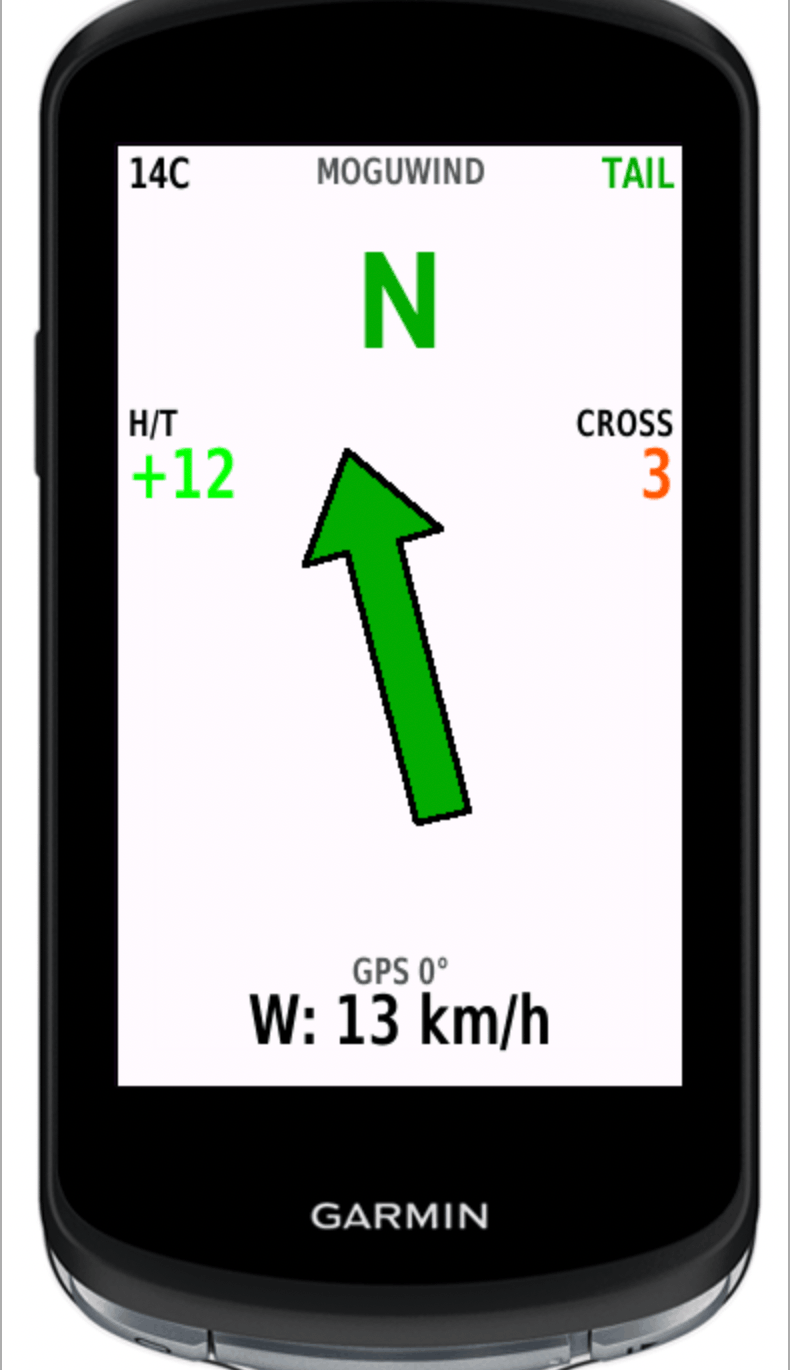
So you can tell at a glance which mode you are in, when you pick "where it comes from" the letter shows up underlined. In the default mode it looks just like it always has, no underline. That is the whole change on screen. Nothing else.
See the wind at every kilometre of your next ride, before you leave.
Plan your route with MoguWind →Why a lot of riders prefer "where it comes from"
The reason behind it is simple. In meteorology the wind is named after its origin. When someone says "there is a north wind today", they mean it is coming from the north. That is how the forecast describes it. That is how we talk about it on a group ride. So for plenty of people it feels more natural for the letter to show where the wind comes from.
There is no right answer. It depends on how your head is used to reading the wind. I used to decide for you. Now you decide. And I am happier that way.
How to read all the wind at a glance
The letter is only one part. The screen gives you more, and all of it is about the wind. The big arrow points where the wind is going and changes colour with how it hits you. Green is a tailwind, it pushes you. Red is a headwind, it slows you. Amber is a crosswind, it comes from the side. Grey means the wind is light, under 5 km/h, when it barely counts.
Below that you get the numbers. H/T tells you how many km/h of headwind or tailwind you have right then. CROSS tells you the crosswind. Next to it you see the wind speed with gusts, the temperature and the cardinal letter. All together, on one screen, with your eyes off the road for barely a second.
There is one detail I love. The app shows you where the wind will turn over the next hours. So before you turn for home, you already know if the way back is going to be into your face.
Why wind direction changes your ride
Headwind and tailwind are easy to feel. The crosswind is the sneaky one. A strong CROSS on an open road, a bridge or an exposed stretch pushes your bike around and makes you work to stay steady. That is why the app breaks out the crosswind on its own data field. So you know when to brace and hold your line, and when you can relax and just ride.
That is the whole point of this. Knowing where the wind comes from, or where it is going, is not a small thing. It is reading what is in front of you before it catches you. You pace better. You choose where to push. You reach the hard sections knowing they were coming.
See the wind in real time on your Garmin as you ride. Headwind, tailwind, crosswind and gusts, all on one screen.
Install MoguWind on your Garmin →What doesn't change
To be clear. This option only touches the cardinal letter. It does not change the arrow colour, green tailwind, red headwind, amber crosswind. It does not change the headwind, tailwind and crosswind labels, H/T and CROSS. And it does not change the data saved to the FIT file for Garmin Connect. All of that stays exactly the same.
And when you finish, the wind is saved
This is where a lot of people really get hooked. When you upload the ride to Garmin Connect, the whole wind story is there. Five graphs, one of them your real speed against the air. And eight summary numbers. The one most people look at is Wind Balance. It runs from minus one hundred, all headwind, to plus one hundred, all tailwind. On a loop it should land near zero. That is where you find out, with no arguing with yourself, whether you were slow or the wind was in charge.
This came from a user's message
The option exists because Kike asked for it. He wrote to me, explained how he reads the wind, and it made complete sense. It felt only fair to give it to him, and to anyone who prefers it that way. Half of what MoguWind does today started with messages like his. If you have an idea too, or something that bugs you, write to me. We build this thing together, bit by bit.
Free, no accounts, no ads. It installs in under two minutes from the Connect IQ Store.
Get MoguWind for Garmin →Keep reading about planning routes with wind.