
Best Garmin Connect IQ apps for cycling 2026
My pick of the best Garmin Connect IQ apps that actually earn a slot for cycling, with cards on the table about which ones are mine.
The Connect IQ Store has thousands of apps for your Garmin, which is great until you try to find the right one. There are watch faces, data fields, widgets, tools for running, swimming, golf and sailing, plenty of them built years ago and never touched since. Digging out the ones that fit how you actually ride takes time. I have spent a lot of it here, both as a cyclist who rides a ton and as a developer who built a couple of these apps, so this is my pick of the best Garmin Connect IQ apps for cycling in 2026. The ones I use, the ones I made, and I will flag those clearly, and the ones I recommend on merit. All of them install on a Garmin Edge, and several also run on fēnix, Forerunner and Epix. No filler, only what earns a spot on your screen. And to be clear, this is not a list of twenty apps padded out to look complete. These are the ones I would install on a friend's Garmin, not one more.
Free to install. Takes two minutes. Works on 33 Garmin devices.
Get MoguWind for Garmin →One quick note first. Connect IQ apps install from the Connect IQ app on your phone or from Garmin Express on a computer. You can find every app below by searching its name, and I link the exact listing for each one so you do not grab the wrong app, since plenty of them share similar names.
How I picked the best Connect IQ apps for cycling
Before the list, here is how I built it, because you deserve to know. Four rules. One, the app solves a real problem and is not just cosmetic. Two, it is actively maintained, with recent updates and not left to rot. Three, it is free or freemium with a useful free tier. Four, it does not duplicate something Garmin already ships out of the box. And a transparency note. Two apps on this list are mine, MoguWind and Bidón, and a third one, Torque Training Zones, is one I helped build as a developer for another company. I would rather tell you upfront than pretend I am neutral. They are here because they work, and you can judge for yourself.
MoguWind, real time wind direction on your Garmin Edge
I will start with mine, cards on the table. MoguWind is a data field that shows the wind relative to your heading while you ride. A big coloured arrow points where the wind is going, which is the bit people get backwards at first. Arrow pointing up means it is pushing you along. Green for a tailwind, red for a headwind, amber for a crosswind, grey when it is too light to care about.
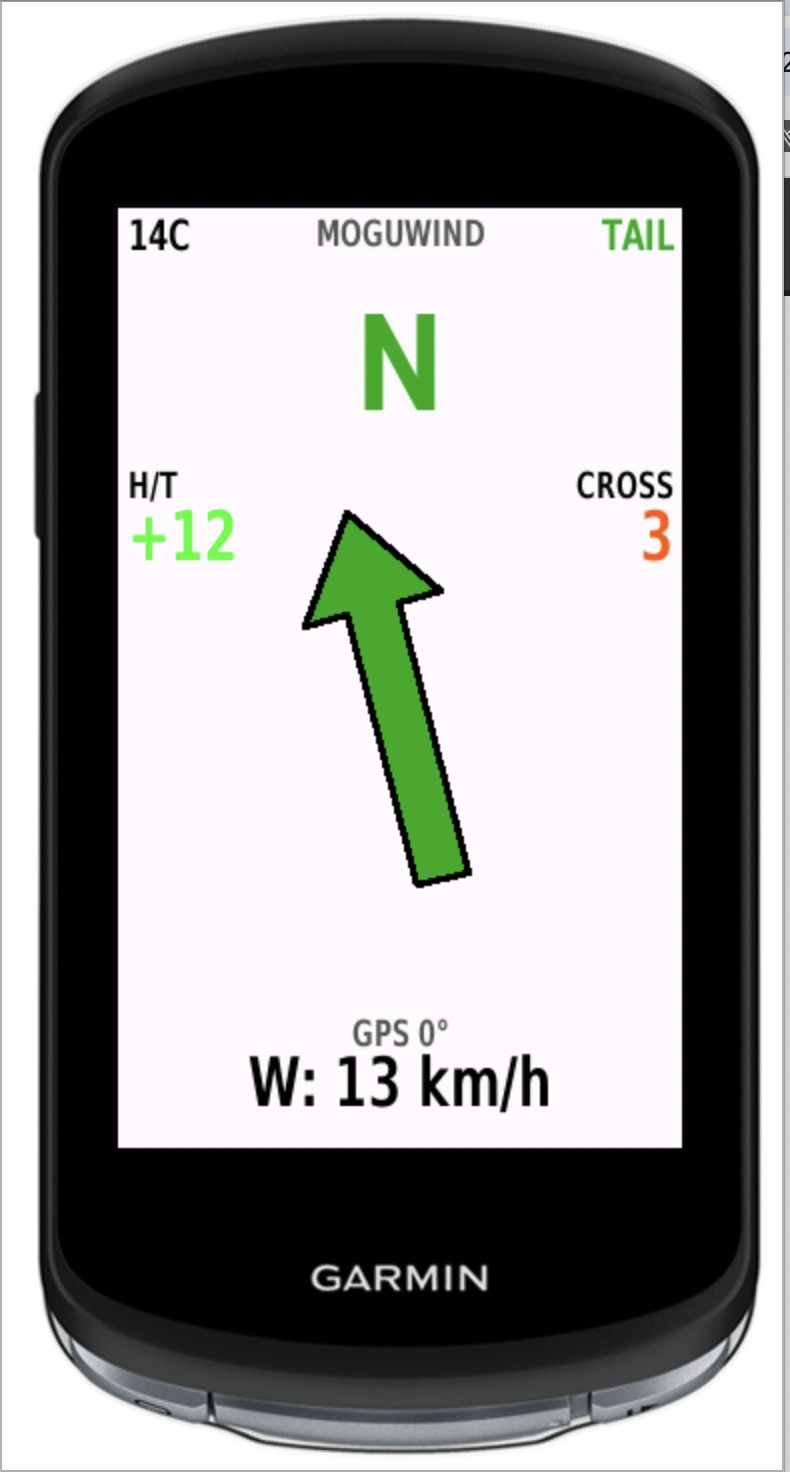
It took me a couple of rides to stop translating it in my head. Now it is the first thing I look at when the road turns and something feels off, and it usually explains why.
Under the arrow you get the two numbers that actually matter. The head or tail component, which is what slows you down or speeds you up, and the crosswind component, which is a different problem entirely. Wind at three o'clock barely touches your speed but it will move you around in the lane, and on a gravel descent that is the one you want to know about. A single wind speed figure hides both of those.
Why it earns a spot. Wind shapes a ride more than almost anything and it is the hardest thing to read ahead of time. Knowing the hard stretch lands at km 40 and not at km 20 changes how you pace it. A silly example, you head out into a west wind and come back the same way, in theory it cancels out, but it almost never does.
It also writes everything into the FIT file, so after the ride Garmin Connect gives you five graphs and eight summary metrics without installing anything else. The one I actually check is Wind Balance, a figure from minus 100 to plus 100 that sums up whether the day was mostly into it or mostly with it. Two Saturdays on the same loop with the same power and a 60 point gap between them is a tidy answer to why one of them hurt.
There is a high contrast mode for reading the screen in full sun, white background and black text, which I added after a summer of squinting at it with polarised glasses on.
One thing worth knowing. MoguWind shows you the wind you have right now, it does not know where you are heading next. For that there is plan.moguwind.com, the web planner, where you load your route and see the forecast along it before you leave. I use both together. Plan tells me what to expect, the data field confirms it on the road.
It runs on 33 Garmin devices across Edge, fēnix, Forerunner and Epix, which is wider than most data fields manage. Always free, no accounts, no subscriptions, nothing premium hidden behind anything. Here is its Connect IQ Store listing. For the record, I built it and I use it on every ride.
Bidón, eat and drink alerts while you ride
The other one of mine, still cards on the table. Bidón is a data field too, and it tells you when to eat and when to drink while you ride. Two big boxes on the screen, EAT and DRINK, each with a countdown, and when the moment comes a full screen alert fires with a different beep for each. Low for food, high for drink, so you know which one it is without looking down.
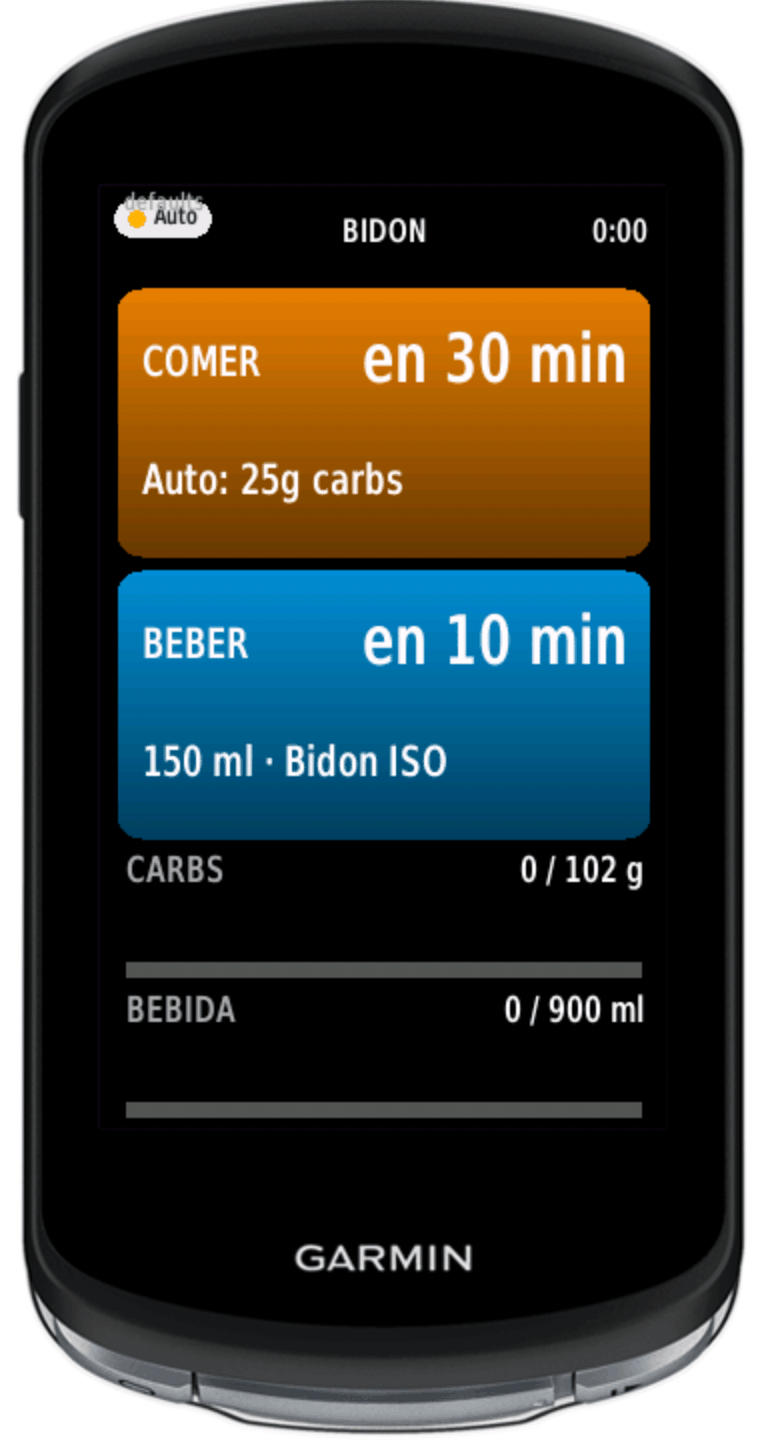
Worth being precise about what it works from, because the name invites confusion and I have seen it described wrongly more than once. It is not a bottle with sensors, and it does not know your route. It has no GPX, no elevation profile, no wind forecast. It works from how long you have been riding, how hard you are going, the temperature, and the bottles you told it you carry. Which, for eating, is the part that matters. A headwind does not empty you because it is wind, it empties you because it makes you push more watts, and that it sees live.
There are three ways to run it. In Auto mode you install it and go, no setup at all, and it works the numbers out as the ride unfolds. That covers most Saturdays. In Manual mode you set your own grams per hour and millilitres per hour from the Edge settings, without touching the web. And in Plan mode it follows a plan you wrote yourself at plan.moguwind.com, with your own food and your own timings, sent to the Edge once with a six digit pairing code. You pair once and never again. If you did not build a plan that day it quietly falls back to Auto.
That third mode is the whole point, really. You sit down on Thursday, decide the gel goes before the climb and not halfway up it, and then on Sunday the Edge remembers it for you while you are head down fighting the wind.
The numbers underneath are not invented. Carbohydrates follow the Jeukendrup ranges, roughly 30 to 90 g per hour depending on duration and intensity. Fluid follows the ACSM and Sawka guidance, around 450 to 900 ml per hour, adjusted upward for heat along the lines Maughan describes. Sodium sits in the 300 to 900 mg per hour band.
It also writes the scheduled carbohydrate and fluid into the FIT file, so afterwards you can see the graphs and totals in Garmin Connect without any extra app. One caveat worth spelling out. Bidón has no way of knowing whether you actually ate, so what gets logged is what it told you to take, not what you took. If you skipped three gels the graph will still draw them.
Free, no accounts. Here is its Connect IQ Store listing. For the record, I built this one too, same idea as MoguWind, make something useful and give it to cyclists.
Torque Training Zones
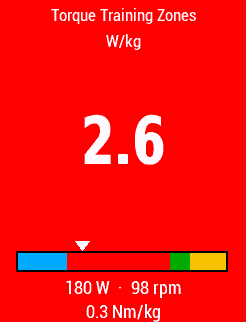
This one is not fully mine, I helped build it as a developer for another company, so I will say so. Torque Training Zones is a data field that shows your power training zones in real time as you ride, with a color code for the zone you are in.
Why it earns a spot. If you do intervals or ride to a power plan, reading the zone at a glance beats staring at the exact number the whole time. It sounds small until you use it in a set and stop letting go of it. I mostly watch it on the trainer and during strength intervals, where the zone matters more than the exact watt of any given second.
It works on Edge and on Garmin watches that read power. Free. Here is its Connect IQ Store listing. I include it because it is a good product that works, not because I put hours into it.
Xert MPA and Power
From here on, third-party apps I use or recommend on merit. Xert has a data field called MPA and Power that shows your current power next to MPA, the ceiling of power you have left before you blow up, based on your fatigue right now.
Why it earns a spot. If you already train with watts, seeing how much real headroom is left before a sprint or near the top of a climb is gold for pacing. It goes further than a plain power zone.
It needs a power meter and an Xert account, with a useful free tier and paid features on top, so freemium. It runs on many Edge units and Garmin watches. Here is the Connect IQ Store listing.
What's My FTP?
Also from the Xert crew, and this one is free. What's My FTP is a simple data field that works out your FTP on the fly, without sitting down for a formal twenty minute test.
Why it earns a spot. Almost everyone hates the FTP test and does it once in a blue moon. An estimate that updates itself when you push hard on a normal ride is convenient and good enough for most riders. It will not replace a proper test if you race, but for anyone who just wants a number to set their zones by, it does the job.
Free, though it needs a power meter to make sense. Compatible with many Edge units and Garmin watches. Its listing is on the Connect IQ Store.
dwMap
dwMap lets you view and follow routes imported from Strava, Ride with GPS, Komoot or a GPX on Garmin devices that lack full native maps, mostly watches like fēnix or Forerunner.
Why it earns a spot. If you head out with a watch instead of a bike computer, or you have a model without strong navigation, dwMap keeps you from getting lost. You build the route on their site and it lands on the watch on its own.
There is a free version and a Premium tier with extras like 3D previews and background maps, so freemium. On a modern Edge with its own navigation you will lean on it less. Its listing is on the Connect IQ Store.
BikersField
BikersField is a highly configurable data field that packs several metrics onto one screen, from speed and distance to GPS and power, all laid out the way you want.
Why it earns a spot. If you would rather keep all your info on one screen instead of flipping between several, this lets you consolidate it. It is a favorite among riders who like to tweak their Garmin down to the last detail.
Free and open source. Compatible with a wide range of Garmin devices. Here is its Connect IQ Store listing.
Other solid Garmin Connect IQ apps worth trying
Four that miss the list but deserve a nod. TrainingPeaks used to have a Connect IQ app to push your workouts to the Garmin, but you no longer need it. Plans now sync straight through Garmin Connect, and on top of that Garmin bought TrainingPeaks in 2026, so the integration runs the native way. ClimbPro and Best Bike Split are genuinely useful for climbs and for nailing your pacing, but they ship built in on many Edge units and are not Connect IQ as such. Trailforks is excellent for MTB with community routes. And Strava is Strava, I leave it off the list because everyone already has it.
Which Connect IQ apps to install first
One piece of advice from someone who has filled and cleared the Garmin screen a hundred times. Do not install them all at once. Pick two or three that solve a problem you actually have and stop there, because a data field you never look at is just clutter. In my case the three constants are MoguWind for wind, Bidón for food and Torque for power zones, and that covers me most of the time.
If you want the full picture, the two of mine work best alongside the web planner. You check the route at plan.moguwind.com the night before, see the wind and build the nutrition plan, and then both data fields carry that on the bars the next morning. Not required, and plenty of people just run them in Auto and never open the site. But that is how I use them.
And if the Connect IQ Store ever stops pairing with your Edge and you cannot install anything, I wrote up how I fixed it when it happened to me.
MoguWind. Free to install, works on 33 Garmin devices.
MoguWind landing →Get MoguWind on the Connect IQ Store.
Install MoguWind →Bidón. Nutrition alerts on your Edge, free.
Install Bidón →Keep reading about the wind app for Garmin.