
How to Detect Wind on a Cycling Ride with MoguWind for GARMIN
A free Garmin data field that detects wind on every cycling ride in real time: headwind, tailwind, and crosswind, kilometre by kilometre.
Wind is the one variable most cyclists never track. It drains your legs on a false flat, costs you 5 km/h without warning, and makes you question your fitness when you have actually spent 30 minutes fighting a wall of air. Detecting the wind on a ride used to mean guessing. MoguWind changes that, detect wind cycling.
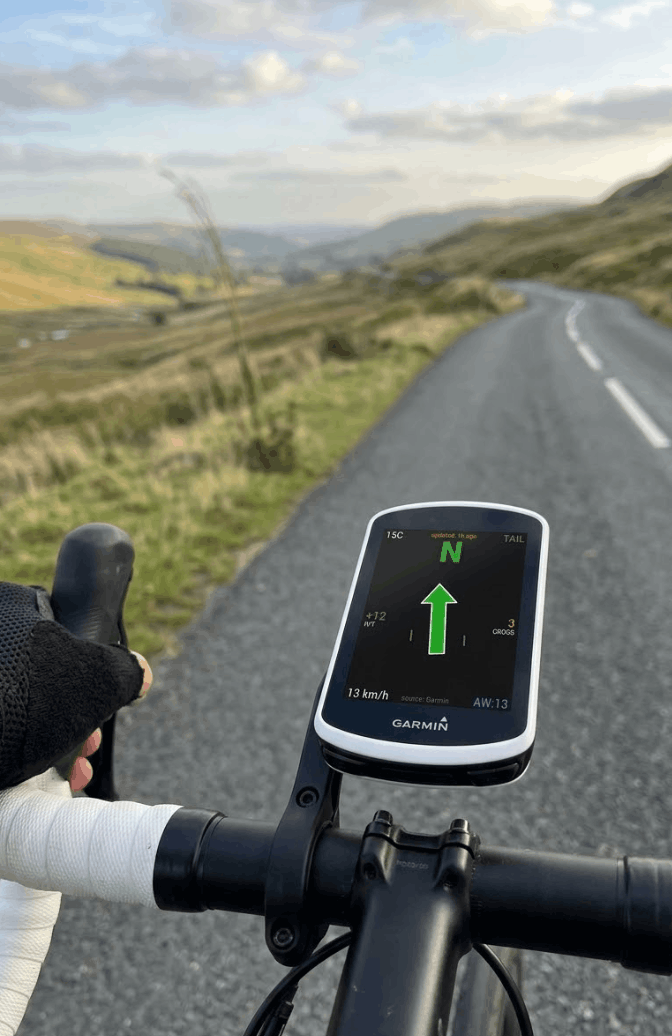
MoguWind is the free Garmin data field that shows you the wind in real time as you ride. Direction, strength, and whether it is working for you or against you. The latest version, 2.6.6, is the sharpest it has ever been.
Free to install. Takes two minutes on the Connect IQ Store. Works on 32 Garmin devices.
Get MoguWind for Garmin →How to detect wind direction with one glance on Garmin
A large, colour coded arrow in the centre of your screen tells you at once what wind you are dealing with, relative to your direction of travel.
- 🟢 Tailwind, pushing you. Push harder, today you fly.
- 🔴 Headwind, fighting you. Pace yourself, do not blow up in the first third.
- 🟡 Crosswind, side on. Hold your line and watch the descents.
No abstract degrees to translate in your head at 40 km/h. One look and you know whether the wind is working for you or against you. That is the point of tracking the wind on a ride, making it something you act on, not just something you notice.
No abstract degrees to translate at 40 km/h. One look and you know whether the wind is with you or against you.
Real-time wind detection data while you ride
Alongside the arrow, MoguWind gives you the numbers that matter, kilometre by kilometre.
- Wind speed, plus the headwind, tailwind and crosswind components shown separately.
- Wind speed and gusts.
- Temperature and the cardinal direction.
- Where the wind will shift over the next hours, so you can get ahead of it.
- Two configurable data fields. Speed, average speed, power, heart rate, cadence, distance, elapsed time or ascent, each with its label in your own language.
The data comes from Open-Meteo, free and with no API keys, and your Garmin's onboard weather steps in as a fallback when there is no coverage. You are never left without information mid ride.
See the wind at every kilometre of your route before you leave, and pick the best time to ride.
Plan your route with MoguWind →Wind cycling analysis in Garmin Connect after your ride
MoguWind records the wind into your activity file. When you upload to Garmin Connect, you do not just have power and heart rate, you have the full wind story of your ride, second by second.
- Second by second graphs. Wind speed, the head and tailwind component, crosswind, and airspeed, which is your speed plus the headwind, the real air resistance you fought.
- Ride summary. Average wind, average headwind, peak gusts both ways, and the split of your ride as a percentage of head, tail and crosswind.
- Wind Balance. Was the day in your favour or against you overall?
You can finally answer the question every cyclist asks. "Was I slow, or was the wind actually horrible?" It was almost always the wind. Now you can prove it.
Was I slow, or was the wind actually horrible? It was almost always the wind. Now you can prove it.
Do not need that much detail? The FIT recording is configurable. Full, Essential or Off.
Latest wind detection features for cyclists
- Field labels in your language. The configurable fields now show their label in the rider's language, not just English, and you can hide them for a cleaner screen.
- Sun mode. A high contrast layout with white background and black text, readable in full sun even with polarised glasses. Off, On or Auto, where Auto switches on by itself on clear, high UV days.
- You choose what the compass letter shows. Where the wind is going, as always, or where it comes from. The arrow never changes, it always points where the wind is going.
- Optional wind extras. A wind rose, the net effect in km/h, wind watts, which is the power the wind costs or gives you, and gust lines when it blows hard.
- Settings in your phone's language, and up to date compatibility with the latest Edge firmware, including the 1050.
Detect wind in your preferred language and units
- 11 languages. Spanish, English, French, German, Italian, Portuguese, Dutch, Indonesian, Japanese, Chinese and Russian.
- Your units. Celsius or Fahrenheit, and km/h, mph, m/s or knots.
- Adjustable font size and a layout that adapts to both round and rectangular screens.
- Works on 32 Garmin devices across the Edge, fēnix, Epix and Forerunner ranges.
No account, no email, no data sold. Install it, pick your language, and ride.
Free wind detection with no account required
MoguWind asks for no account, no email, and sells no data. Install it, pick your language, and ride. No subscription, no 30 day trial, no catch. Tracking the wind on a ride has never been this simple, or this free.
The wind isn't going anywhere. The difference is you'll see it coming. And on the long days, the other thing that decides how you feel is your fuelling, so Bidón is the free companion that tells you when to eat and drink as you ride.
Free on Garmin Edge. Bidón tells you when to eat and drink so you never bonk again.
Get Bidón for Garmin →Keep reading about the wind app for Garmin.