
Where MoguWind gets its wind data: our data sources
Open-Meteo, a 3 km grid and 128 bytes to your Garmin. The source we use, what happens when it fails, and why the screen always tells you which, our data sources.
Let's see our Data Sources in Moguwind. You are riding, you glance at the arrow on your handlebars, and you make a call. Turn here and it is behind you. Carry on and you eat it head on for the next twenty kilometres.
You are making that decision with a number an app handed you. So you ought to know where it comes from, how precise it is, and what happens on the days it does not arrive.
Free to install. Takes two minutes. Works on 33 Garmin devices.
Get MoguWind for Garmin →Where the wind data on your Garmin comes from
The main source is Open-Meteo, through its official API. No scraping, no undeclared feeds.
It is an open European numerical model, the same family professional forecasters work with. We did not build it and we do not claim to have. What we do is take that reading, cross it with the direction you are actually travelling, and show you the only thing that matters while you pedal, which is how much of that wind is holding you back and how much is pushing.
Why the grid is 3 km and not finer
Wind is not requested point by point. It is requested by cells, and the cell size was picked by measuring rather than guessing.
Several resolutions were compared against the exact coordinate across eight locations with different terrain. This is what came out:
| Cell size | Speed error | Direction error |
|---|---|---|
| 11 km | 1.04 km/h | 8 degrees |
| 6 km | 0.24 km/h | 6 degrees |
| 3 km | 0.24 km/h | 2 degrees |
| 1 km | no gain | no gain |
From 11 to 6 the jump is large. From 6 to 3 the speed stops improving but the direction error drops by two thirds, and direction is exactly what decides whether a wind counts as head or cross. From 3 down to 1 there is nothing left to win.
So the cell is 3 km. Not because it sounds tidy, but because going finer stopped changing the number you see.
What actually travels to the watch
A Garmin data field has very little memory to work with. Very little. Send it a large response and it does not get slow, it falls over, and you lose the field halfway through a ride.
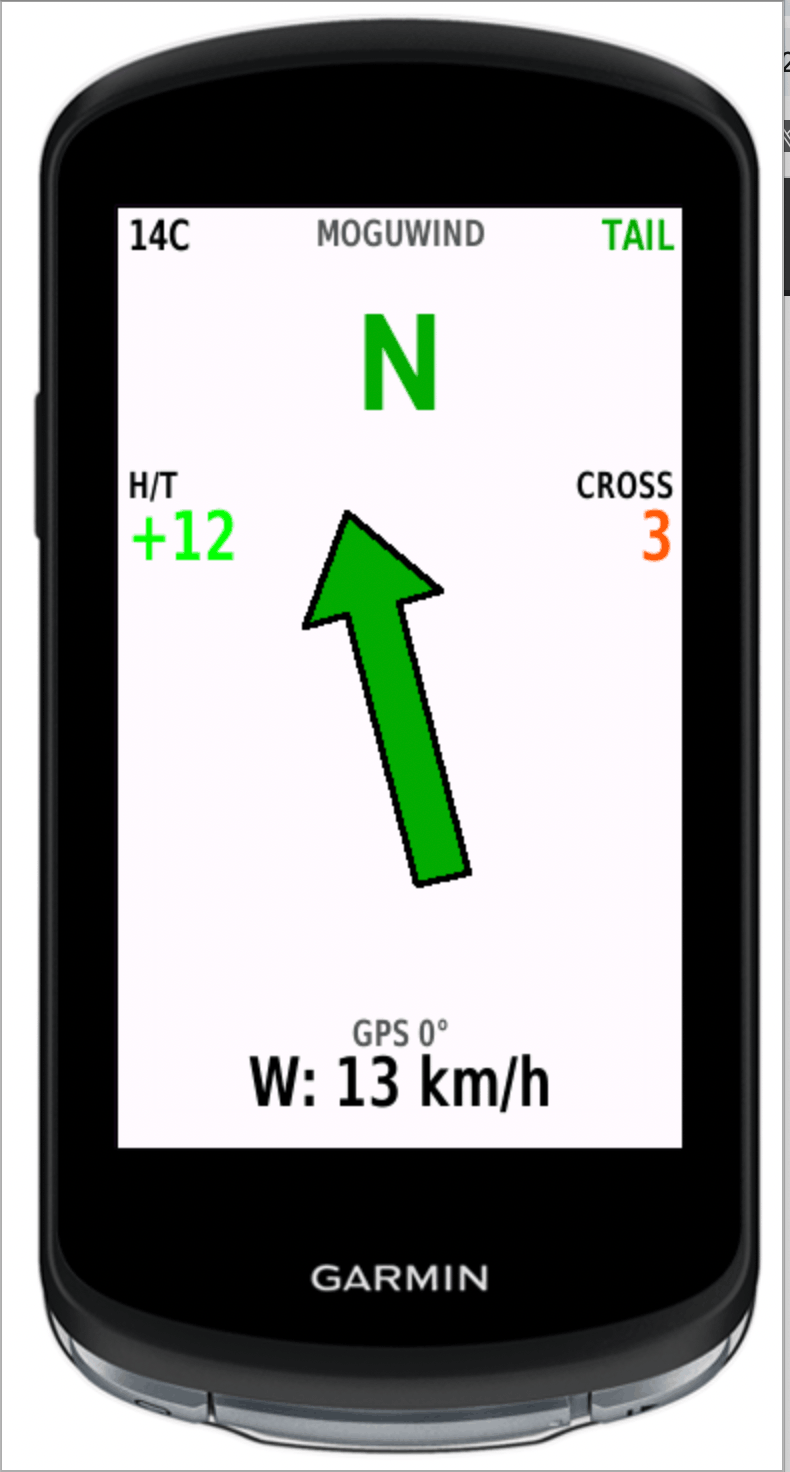
So the watch gets the bare minimum. Wind speed, direction, gust and the current temperature. Four values, 128 bytes, nothing else.
Everything else happens on the device. The head and tail component, the arrow, the crosswind, all of it is worked out there from those four numbers and your GPS heading.
What happens when Open-Meteo does not arrive
It happens. You drop into a valley with no signal, the phone loses data, or the service has a bad few minutes.
When it does, the field does not go blank. It falls back to Garmin Weather, the forecast your head unit already stores. That works with no connection at all, which is precisely what makes it worth having on an empty road.
It is worse, though, and that is worth saying plainly. Coarser, further behind, and no gusts. Which is why it is a backup and not a source.
The screen always tells you which one you are reading
This is the part we care about most.
When the reading comes from Open-Meteo, the screen says so. When it comes from Garmin Weather, it says that instead. Two labels, OM and GW, and you see them without hunting for them.
One is never quietly swapped for the other. If you are deciding whether to push on or turn back, you need to know whether the number in front of you is the good one or the emergency one.
The third step, the last good reading
If Open-Meteo is unreachable and Garmin Weather has nothing either, the last valid reading stays on screen for up to twelve hours.
From twenty minutes onwards it is labelled with its age. Wind from half an hour ago is still useful in plenty of places. Wind from six hours ago is not, and you are the one who should get to decide that.
Why we removed a provider instead of adding one
There was a fourth provider in the cascade. It was taken out deliberately on 25 October 2026.
The reasoning is short. Quietly swapping one model's wind for another's means a rider plans a route believing they are looking at the usual thing when they are not. Two models can disagree by several degrees and a few km/h at the same spot, and that gap is what sends you right instead of left.
A declared gap beats an invisible patch. Fewer sources and knowing which one you are on is worth more than more sources and no idea.
One call serves many riders
If you are riding somewhere busy, chances are several of you are sharing the same reading without knowing it. Everyone inside the same 3 km cell gets the same data from a single request.
That is not only about saving work. It is what keeps the service standing on a Saturday when a few hundred people are on the same roads at the same time, and keeps your arrow moving.
What you can check for yourself
On your next ride, look at the label. OM means you are on the proper model. GW means you are on the backup and the reading lags. If an age appears next to it, you know how long ago that number was true.
You do not have to take this article's word for any of it. It is written on the screen.
Free to install. Takes two minutes. Works on 33 Garmin devices.
Get MoguWind for Garmin →Keep reading about cycling, wind and routes.