
Send nutrition plan to Bidon from route planner
MoguWind Plan lets you build a complete fuelling strategy and send it to Bidón on your Garmin Edge. Here is how, and what to put in the plan.
Fuelling on a long ride is not something you wing on the day. The smartest cyclists work out exactly when and what they will eat, and then make sure that plan is in front of them while they ride. That is what sending your nutrition plan to Bidón from a route planner like MoguWind Plan does. Your fuelling strategy goes with you on the bike, with no switching screens and no guesswork.

Good fuelling and hydration make a real difference on anything over 90 minutes. But that only helps if you actually stick to the plan. The moment your fuelling schedule lives somewhere you cannot see mid ride, it stops working. That is the gap this fixes.
Why Bidón and a Route Planner Belong Together
Bidón is built for exactly this. It is a free data field for your Garmin Edge that holds your eat and drink targets and sits right on your screen as you ride. Pair it with a route planner and you are not bouncing between apps or retyping your numbers. You plan once, and the data flows to the Edge on your handlebar.
This solves a real problem. Most riders plan their nutrition in a notes app or a spreadsheet and then forget to look at it. Others plan the route in Strava, but Strava knows nothing about fuelling. MoguWind Plan bridges that gap. It is a route planner for riders who care about the details, the wind, the climbing, and now the fuelling too.
You plan once, and the data flows to the Edge on your handlebar.
How to Send Your Plan to Bidón
The whole thing takes about five minutes for a typical event, and you only set up the pairing once.
- Build your route in MoguWind Plan. Import a route from Strava, draw a new one, or load a saved one. The planner shows you the elevation, the distance and the wind for every kilometre. There is a live demo on the Tourmalet and Hautacam example.
- Build your nutrition plan with your own food. Set your targets and the food you will actually carry, and the planner works them out against the real effort of the route, wind included.
- Pair your Edge once, with a code. Link your Garmin to the web with a one time code. No account, no email.
- Send it to the Edge. Your plan lands on the device and Bidón follows it, prompting you to eat and drink at the right moments as you ride.
And if you head out without a plan that day, Bidón just falls back to Auto. It works out the grams and millilitres on the fly from your ride duration, your intensity, the temperature and the bottles you are carrying. Either way, you are covered.
Free on Garmin Edge. Build your plan, send it once, and Bidón tells you when to eat and drink.
Get Bidón for Garmin →What Targets to Put in Your Plan
If you are not sure what numbers to aim for, here is the science, and it is the same science the planner and Bidón run on.
- Carbohydrate. 30 to 90 g an hour on rides over 90 minutes, with 90 as the ceiling for a well trained gut (Jeukendrup).
- Fluid. 450 to 900 ml an hour, toward the top end in the heat or on long climbs (ACSM).
- Sodium. 300 to 900 mg an hour, more when it is hot and you are sweating hard.
Start there, then adjust with your own experience. How you felt on the last long ride tells you more than any table. The point of the plan is to turn those numbers into food at the right kilometre, not to leave you doing sums on the bike.
Why Wind Changes the Numbers
Here is the part most planners miss. Knowing you need 500 calories by kilometre 80 is useless if you do not know whether that stretch is into a headwind, uphill, or with the wind at your back. A headwind burns more. MoguWind Plan factors the wind into your route, so when you set a target you are already accounting for the effort. Send that to Bidón, and Bidón knows not just what you need, but why.
A headwind burns more calories. Your plan should know that before you do.
How to send a nutrition plan to Bidon from your route planner
The two apps split the job cleanly. MoguWind Plan is the strategy layer, where you see the wind and the climbing and build your fuelling around them. Bidón is the execution layer, the reminders and the tracking on the bike. Together they replace a spreadsheet and a lot of guesswork with one simple flow. Plan in MoguWind, ride with Bidón.
A quick way to build a good plan. Look at the wind chart and the elevation, and mark the sections with a headwind or a climb, because those demand more. Set your fluid and food targets for each part. Check that the timing lines up with where you expect the feed stations. Then send it to the Edge and go.
See the wind at every kilometre and build your fuelling around it, before you leave.
Plan your route with MoguWind →A Real Example
Say you have a 150 km sportive with a long, exposed 40 km drag into the forecast headwind from kilometre 60 to 100. On a flat plan you might set an even feed every 90 minutes. But that headwind section is where you will burn the most, so you load carbohydrate before kilometre 60, move to feeds every 45 to 60 minutes through it, and keep something in your pockets for the run in. Build that in MoguWind Plan, send it to Bidón, and the alerts come exactly when you need them, even while you are head down fighting the wind. That is the difference between finishing strong and limping the last 30 km.
Can you sync nutrition plans between route planner and Bidon?
Do I need both apps? MoguWind Plan is the planner and Bidón is the on bike companion. You can use just the planner and screenshot your notes, but sending it to Bidón means the plan is already formatted and in front of you exactly when you need it.
Can I change my plan after sending it? Yes. You can adjust on the device, and Bidón's Auto mode keeps adapting to your real effort as you ride. If you make big changes, redo the plan in MoguWind Plan so it stays lined up with your route and the wind.
What if I do not know your targets? Start with the ranges above, 30 to 90 g of carbohydrate an hour and 450 to 900 ml of fluid, and tune from there. Or just let Bidón run in Auto and it will scale to your effort for you.
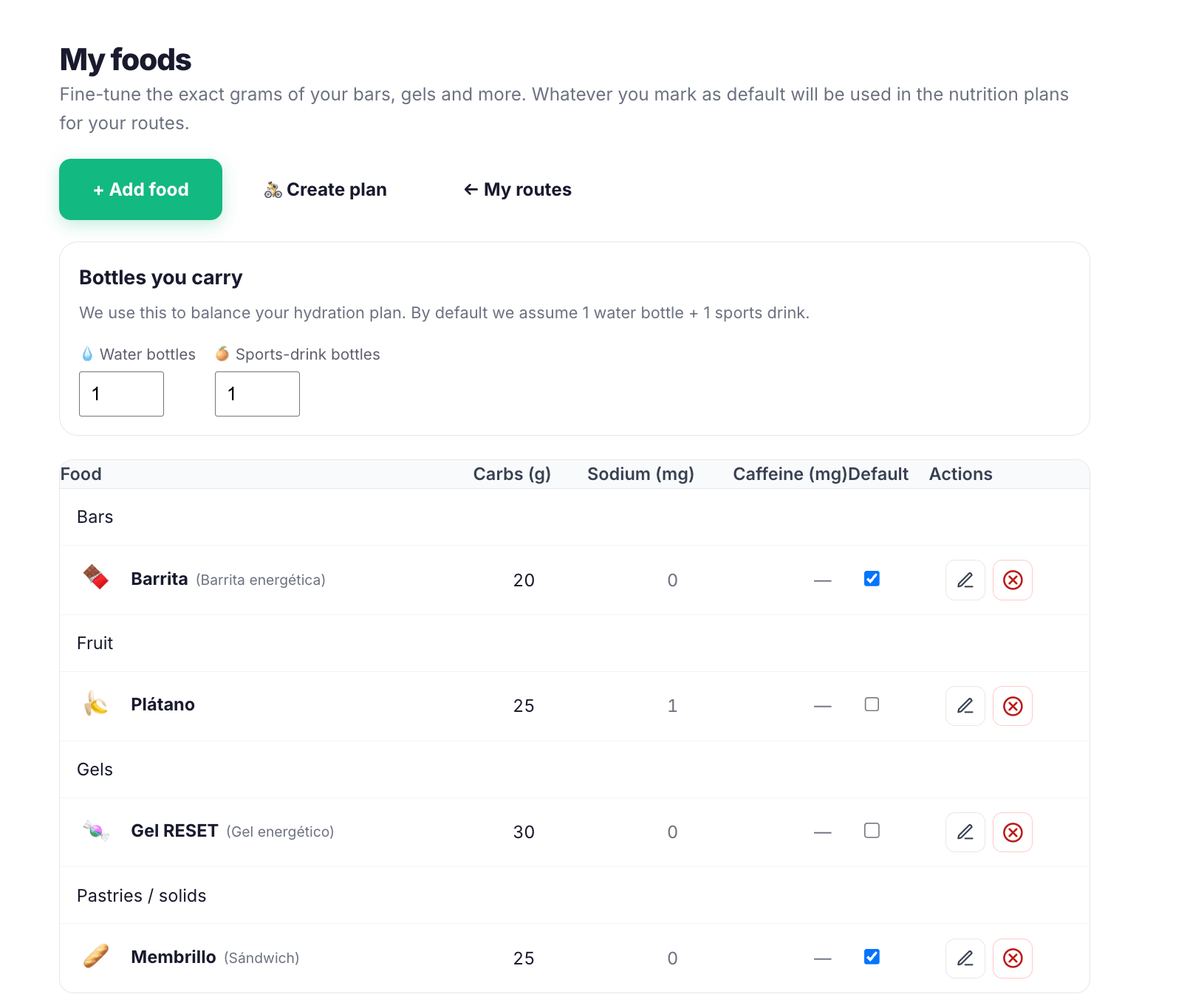
Build your nutrition plan once, sync it to Bidon automatically
Sending your nutrition plan to Bidón takes the friction out of fuelling. You design it once, send it once, and then trust it on the road. That matters most on events with several feed stations, or on self supported rides where you need to know exactly where and what you will eat. And because the plan already knows the wind, you are not wondering "should I eat now?" halfway up an exposed climb. The plan answered that before you started.
You are not wondering should I eat now. The plan answered it before you started.
Start at plan.moguwind.com, build a route with your fuelling targets, and send it to Bidón. In a few minutes your strategy is live on the bike. That is smarter riding.
Stop doing sums on the bike. Let Bidón run your plan and tell you when to eat and drink.
Get Bidón for Garmin →Install it free on your Garmin Edge from the Connect IQ Store.
Download Bidón for Garmin →Keep reading about nutrition for cyclists.