
How to Share a Cycling Route with Your Group
Sharing a cycling route with your team or riding group has never been easier. MoguWind Plan lets you create, plan, and distribute your route in minutes—with wind data included.
When you're organising a group ride, the last thing you want is confusion about where everyone's going or what conditions to expect. Sharing a cycling route with your group shouldn't mean email chains, screenshots and three different navigation apps. MoguWind Plan lets you build a route once and share it, wind forecast and all, so everyone on the team knows what's coming before they clip in.
Why Route Sharing Matters for Group Rides
A group ride works best when every rider turns up prepared. That means knowing the distance, the elevation, the turn points and, yes, the wind. When riders don't have the route beforehand, you lose time at the meeting point, you risk wrong turns mid-ride, and you miss the chance to talk tactics, like who does what on the headwind sections.
Sharing the plan also builds a bit of accountability. If the group can see the route and the wind forecast in advance, they can train for it, bring the right kit, and decide whether the conditions are for them. No surprises at the start line.
Build your group's route and see the wind at every kilometre before you set off.
Create a route in MoguWind Plan →How to create a cycling route in MoguWind Plan
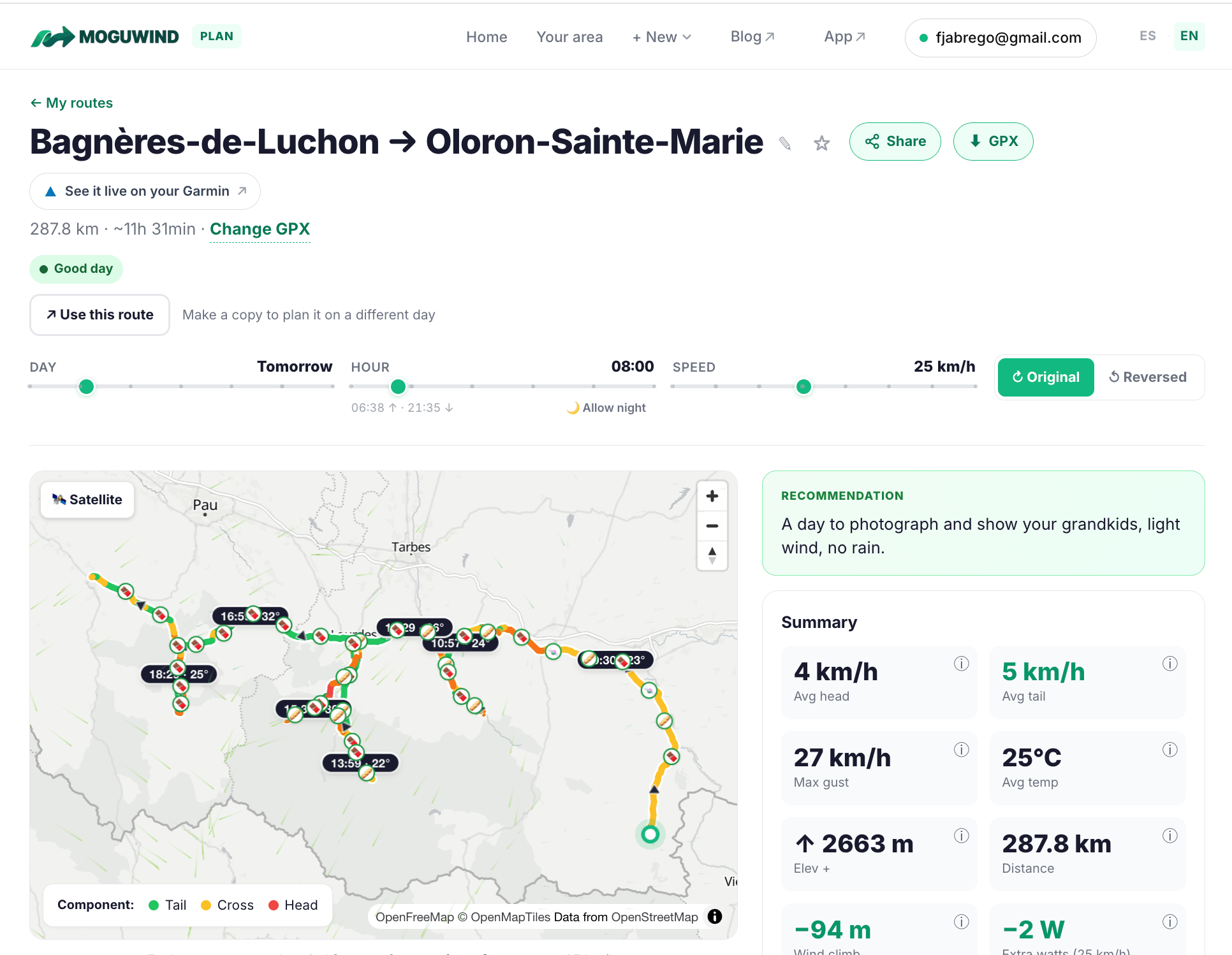
Start by building the route. Open MoguWind Plan and either import a route from Strava or a GPX file, or draw it straight on the map. The planner works out distance, elevation and, uniquely, the wind speed and direction section by section for the departure time you choose.
Unlike generic wind maps that show a single forecast for the whole area, MoguWind tells you what wind you'll face at each kilometre of your route. That's the part that matters for group planning: you can spot where headwinds will slow everyone down and where a tailwind gives you a breather.
Share your cycling route with a link
Once the route is saved, MoguWind Plan gives you a link to share. No file exports, no asking people to create accounts. Copy the link and send it by email, WhatsApp, Slack, or however your group talks.
When they open the link, they see:
- The full route on the map
- Total distance and elevation gain
- Wind speed and direction for each section of the route
- The elevation profile alongside the wind
- A GPX download to load the route into their GPS or phone
If you tweak the route before the ride, just share the updated link so everyone's looking at the same plan.
One link, the whole group on the same page: route, elevation and wind, section by section.
Plan and share your route →How groups decide routes using wind forecasts
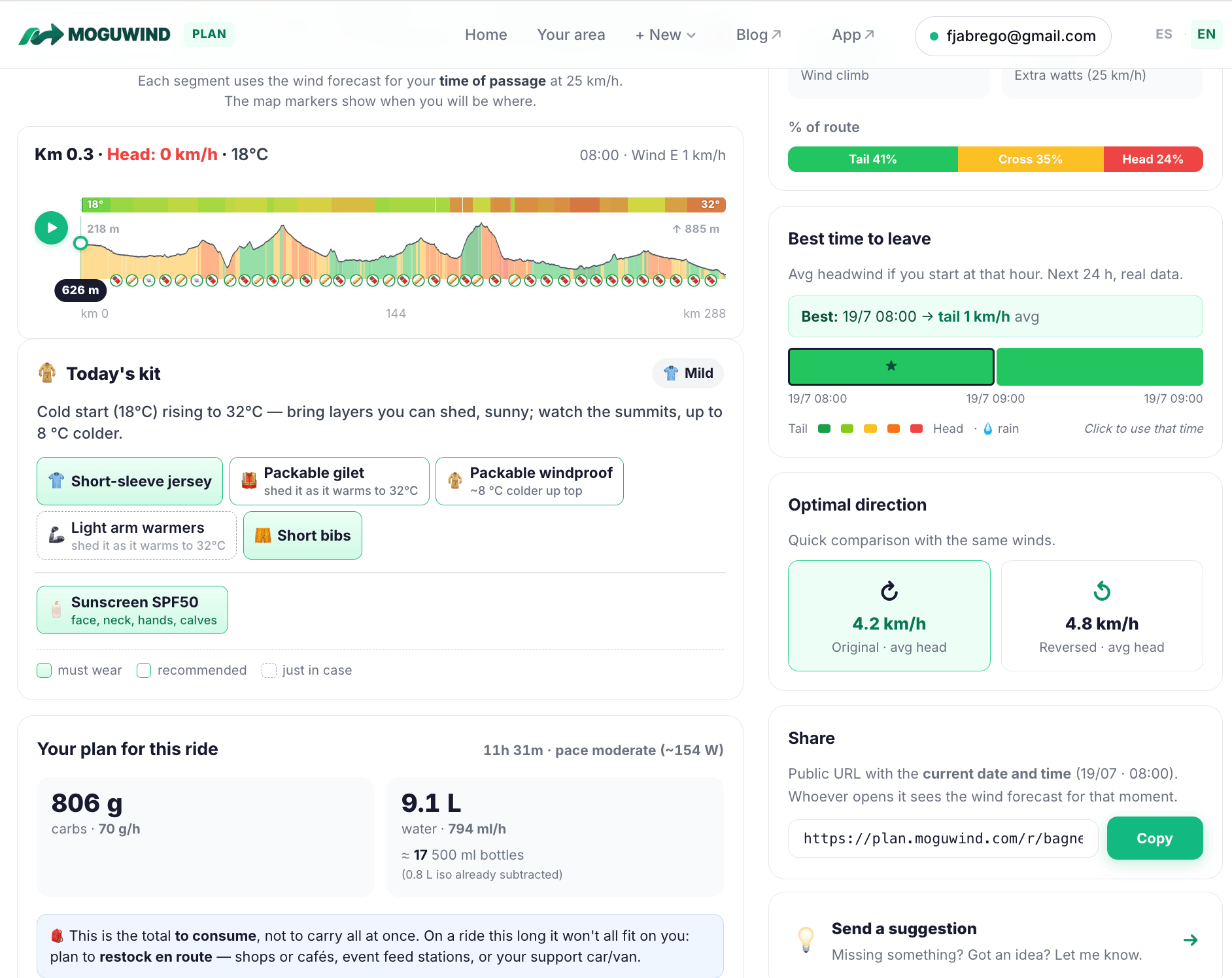
This is where MoguWind Plan changes how you plan a group ride. Instead of guessing at the wind, you see it section by section. A 100 km route might have 40 km of gentle tailwind, 35 km of neutral wind and 25 km of awkward headwind. That's information the group can act on.
You might decide to take the headwind section early, while legs are fresh, or set a pacing plan just for that stretch. You can also check whether a course suits the group's strengths: if it's mostly exposed headwind and your riders climb better than they grind into the wind, you might pick a different route altogether.
See where the headwind hits and pick the smartest departure time for the whole group.
Try MoguWind Plan →Exporting Routes for Navigation
The shared link is for planning. On ride day the group needs navigation, so from the route page each rider can download the GPX and load it onto their bike computer, phone app or watch. And if you ride with a Garmin, the MoguWind app for Garmin shows the live wind on the screen while you follow the route, so you can see whether the day is matching the forecast you planned around.
See the wind live on your Garmin while you ride the route.
Get MoguWind for Garmin →Tips for Effective Group Route Sharing
- Share it 3 to 5 days out. That gives people time to look it over, ask questions and shuffle their schedule. Forecasts settle down around 3 to 5 days ahead, so you're not chasing a moving target.
- Add a short note with the link. "25 km, 600 m of climbing, 20 km/h headwind on the final 10 km, meet at 8am" tells the story in one line.
- Re-share 24 hours before if things shift. Forecasts move; if the wind direction changes a lot, send a quick update.
- Read elevation and wind together. A climb into a headwind is far harder than a climb with a tailwind. Flag those combinations so riders prepare for them.
- Fix a start time. Wind forecasts are tied to specific hours, so if the group rolls out at 9am, set the route's departure time to 9am and the forecast will match what you actually get.
Collaborate on group cycling routes in real time
Route sharing is just the planning layer. On the day, riders with a Garmin can use the MoguWind app to see the wind in real time as they ride, while everyone else navigates on their usual bike computer and leans on the MoguWind forecast for the section-by-section wind plan.
The point is that everyone starts with the same picture: where you're going, how far, what the climbing looks like, and, crucially, what wind to expect. That shared clarity makes group rides safer, smoother and a lot more enjoyable.
See the wind at every kilometre of your next ride, before you leave.
Plan your route with MoguWind →Keep reading about planning routes with wind.