
Import Strava Routes to MoguWind Planner
Skip the manual route-building. Import any Strava segment or ride directly into MoguWind Planner and instantly see the wind breakdown for every kilometre.
You have a solid Strava route saved. You know the terrain, the distance, maybe even the rough time. Here is what Strava does not tell you. Where the headwind will hit you hardest, or where a tailwind might hand you a free boost. That is what importing your Strava routes into MoguWind is for. In a few clicks you can take any route and see exactly how the wind will affect each kilometre of your ride.
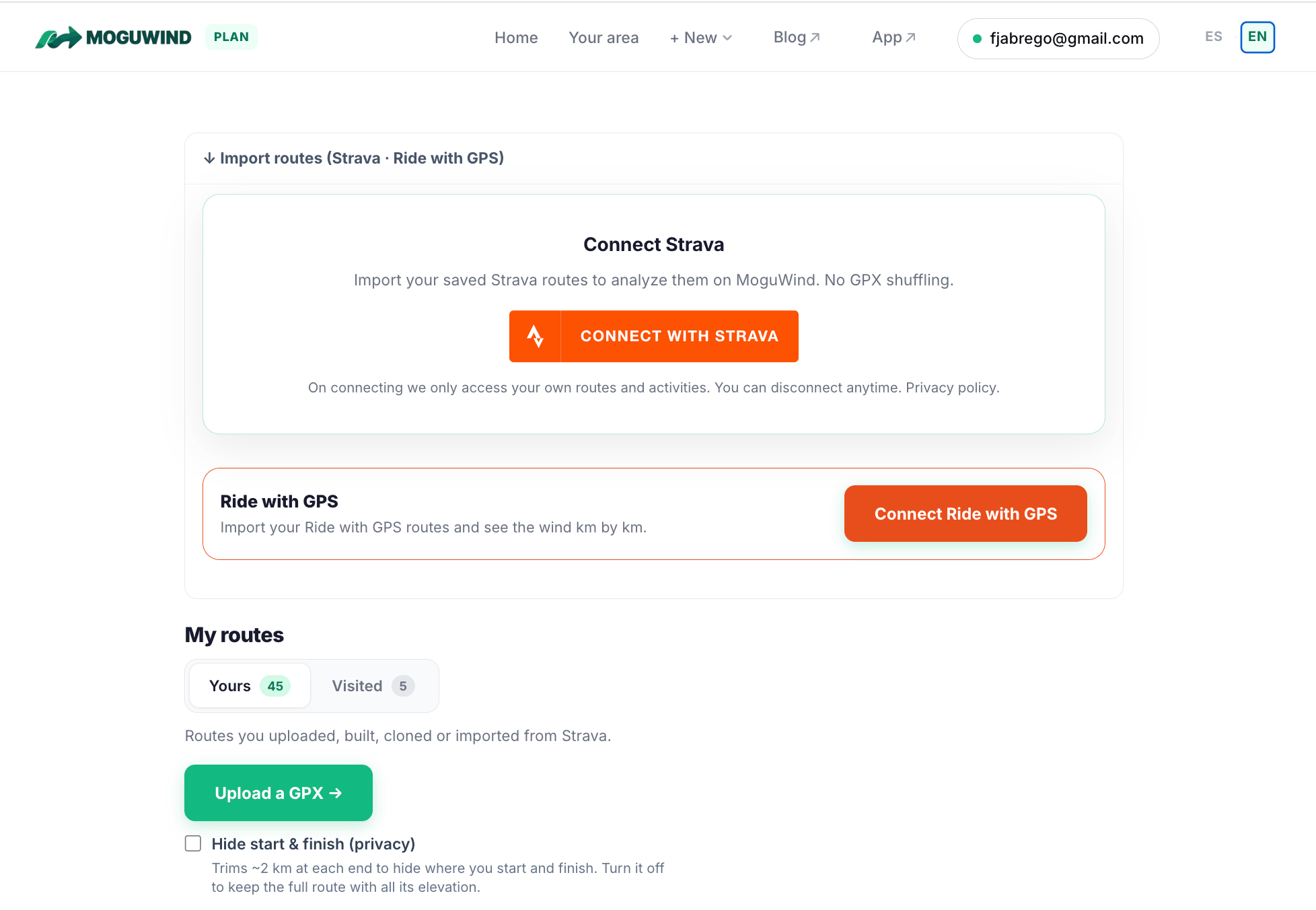
Why Import Your Strava Route
Most cyclists plan rides in Strava, Komoot or Ride with GPS. Those tools do one thing well. They store your route and log your effort. What they do not do is forecast the wind. And wind matters. A 15 km/h headwind on a long climb can add 20 minutes to your time. A tailwind on rolling terrain can feel almost free. Without knowing when the wind will hit, you cannot pace yourself properly or even pick the best day to ride.
MoguWind Plan closes that gap. Once you import a Strava route, the planner works out the wind speed and direction for every single kilometre, at the exact time you plan to ride. This is not one wind value for the whole route. It is kilometre by kilometre data. You see where the headwinds cluster, where you get relief and how the overall wind stacks up against your expected pace.
Step by Step, Importing Your Strava Route
The import is straightforward. Here is how it goes.
- Open MoguWind Plan. Go to plan.moguwind.com in your browser.
- Start a new route. You will see a button to begin a route planning session.
- Paste your Strava URL. Copy the link from your Strava route, or any public route shared by a direct link, and paste it into the import field.
- Let it process. MoguWind pulls in the route and stores it. This takes a few seconds.
- Pick your date and time. Choose when you plan to ride, and the planner forecasts the wind for that window.
- Read the wind analysis. Scroll down to see your route with the wind on top, coloured by strength and direction at each point.
That is it. No manual route building. No redrawing segments. Your Strava route is now live in MoguWind with the full wind picture.
Paste your Strava route and see the wind at every kilometre before you ride it.
Import your route into MoguWind Plan →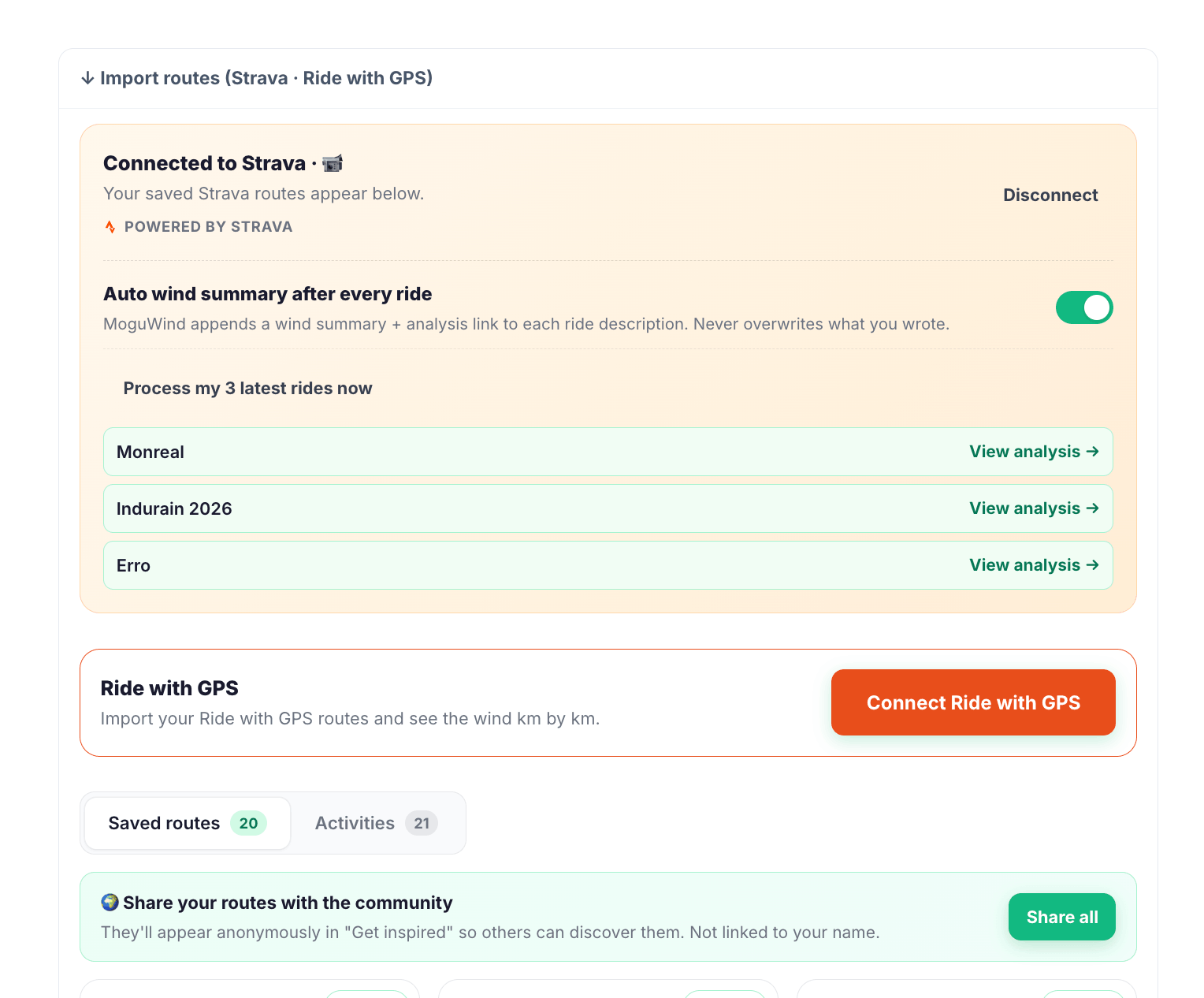
Understanding Your Wind Data
Once your route is in, MoguWind shows the wind in a few ways. The map colours your route by wind strength. You get the wind speed and direction in km/h at each point, and an overall read on how much headwind you will fight against how much tailwind you will enjoy across the whole ride. Here is a live example of how it looks after import.
See a live example of an imported route with wind analysis.
The key part is that the data follows your chosen date and time. Ride tomorrow morning instead of Friday afternoon and the forecast changes with you. That precision lets you make smarter calls about when and how to take on a route.
Why MoguWind Goes Deeper Than Strava
Strava shows you elevation profiles and segment records. MoguWind adds the weather context. Your Strava does not know what the wind does to your energy burn on a climb, or how a crosswind on a descent affects your safety. MoguWind Plan works those out route by route, down to the kilometre.
Generic weather forecasts give you one wind value for a whole region. MoguWind uses real forecast data from Open-Meteo to project how the wind changes along your exact path. A 50 km route might pass through three completely different wind regimes depending on the local geography and altitude. You will not see that detail anywhere else.
Tips for Getting the Most From Imported Routes
- Import early. Planning a weekend ride? Import and check the wind on Wednesday or Thursday. That gives you time to shift the date or adjust your expectations.
- Check a few days. Forecasts move day to day. Look at Thursday, Friday and Saturday. One of them might have far less headwind.
- Use the wind read for pacing. If the planner shows a lot of headwind overall, plan a steadier average or split the ride across two days.
- Save and share. Once you have looked at the wind, you can save the route or share it with your mates.
What About the MoguWind App
The web planner is where you plan ahead. If you ride with a Garmin, the MoguWind app for Garmin Connect IQ brings the wind to your handlebar. Out on the road it shows the wind speed and direction live as you ride, so you are never caught off guard by a sudden shift. It works on 24 Garmin models across the Edge, Fenix and Forerunner ranges.
By August 2026 the app had passed 10,000 downloads with a 4.7 rating on the Connect IQ Store, because it solves a real problem. Knowing the wind you are actually facing, in real time, without reaching for your phone.
Free to install. Takes two minutes on the Connect IQ Store. Works on 24 Garmin devices.
Get MoguWind for Garmin →The Bottom Line
Your Strava routes are full of potential. You know the turns, the climbs, the distance. Without the wind, though, you are missing a big piece of the puzzle. Importing your Strava routes into MoguWind Plan takes about 30 seconds and gives you the full picture of how the weather will shape your ride. Plan smarter. Know what wind is coming. Ride the route when conditions are best, or adjust your effort with confidence because you know exactly what you are up against.